Sending messages
Make your application send messages to specific conversations.
The conversation identifier is required. You can get it from:
- received message,
- stored conversations,
- or by constructing it manually:
- Kotlin
- Java
- Typescript
val conversationId = QualifiedId(
    id = UUID.fromString("f81d4fae-7dec-11d0-a765-00a0c91e6bf6"),
    domain = "example.com"
)
QualifiedId conversationId = new QualifiedId(
        UUID.fromString("f81d4fae-7dec-11d0-a765-00a0c91e6bf6"),
        "example.com"
);
const conversationId = new Qualified(
  "f81d4fae-7dec-11d0-a765-00a0c91e6bf6",
  "example.com"
)
Text message
- Kotlin
- Java
- Typescript
val textMessage = WireMessage.Text.create(
    conversationId = conversationId,
    text = "Hello world!"
)
val applicationManager = wireAppSdk.getApplicationManager()

applicationManager.sendMessageSuspending(textMessage)
WireMessage textMessage = WireMessage.Text.create(
        conversationId,
        "Hello world!",
        List.of(),
        List.of(),
        null
);
WireApplicationManager applicationManager = wireAppSdk.getApplicationManager();

applicationManager.sendMessage(textMessage);
const textMessage = TextMessage.create({
  conversationId: conversationId,
  text: "Hello world!"
})
const applicationManager = sdk.getApplicationManager()

await applicationManager.sendMessage(textMessage)
Asset message
Upload and send an asset (file) to a conversation.
When sending an asset message, you need to provide the file, name and mime type, while we take care of the encryption and metadata based on mime type.
- Kotlin
- Java
- Typescript
// Get local file from resources
val filename = "my-file.png"
val resourcePath = javaClass.classLoader.getResource(filename)?.path
    ?: throw IllegalStateException("Resource '$filename' not found")
val asset = File(resourcePath)

// Read File data in ByteArray
val originalData = asset.readBytes()

// Send File with necessary parameters
applicationManager.sendAssetSuspending(
    conversationId = conversationId,
    asset = AssetResource(originalData),
    name = asset.name,
    mimeType = "image/png",
    retention = AssetRetention.ETERNAL
)
// Get local file from resources
String filename = "my-file.png";
URL resourceUrl = getClass().getClassLoader().getResource(filename);

if (resourceUrl == null) {
        throw new IllegalStateException("Resource '" + filename + "' not found");
}

File asset = new File(resourceUrl.getPath());

// Read file into byte[]
byte[] originalData;
try {
originalData = Files.readAllBytes(asset.toPath());
        } catch (IOException e) {
        throw new RuntimeException("Failed to read file: " + asset.getName(), e);
        }

// Send file with necessary parameters
applicationManager.sendAsset(
        conversationId,
        new AssetResource(originalData),
        null,
        asset.getName(),
        "image/png",
        AssetRetention.ETERNAL
);
const basePath = 'base_folder'
const filename = 'my-file.png'
const filePath = path.join(basePath, filename)

fs.readFile(filePath, (err, data) => {
  if (err) {
    throw err
  }

  const metadata: Image = {
    type: 'image',
    width: 240,
    height: 240
  }

  this.manager.sendAsset(conversationId, {
    data: data,
    name: filename,
    mimeType: 'image/png',
    metadata: metadata
  })
})
Location message
Share a geographic position in a conversation. The latitude and longitude are required, while
the name (a human-readable description of the place) and zoom
(Google Maps zoom level)
are optional.
- Kotlin
- Java
- Typescript
val locationMessage = WireMessage.Location.create(
    conversationId = conversationId,
    latitude = 52.52527f,
    longitude = 13.36923f,
    name = "Berlin Hauptbahnhof, 10557 Berlin",
    zoom = 50
)

applicationManager.sendMessageSuspending(locationMessage)
WireMessage locationMessage = WireMessage.Location.create(
        conversationId,
        52.52527f,
        13.36923f,
        "Berlin Hauptbahnhof, 10557 Berlin",
        50,
        Clock.System.INSTANCE.now(),
        null  // expiresAfterMillis
);

applicationManager.sendMessage(locationMessage);
const locationMessage = Location.create({
  conversationId: conversationId,
  latitude: 52.52527,
  longitude: 13.36923,
  name: 'Berlin Hauptbahnhof, 10557 Berlin',
  zoom: 50
})

await applicationManager.sendMessage(locationMessage)
Text message with mentions
Mentions allow you to tag users in a message. The Mention object requires the user's QualifiedId, and the offset and length indicating where the mention appears in the text.
- Kotlin
- Java
- Typescript
val mention = WireMessage.Mention(
    userId = targetUserId,
    offset = 0,  // Position in text where mention starts
    length = 5   // Length of the mention text including '@' character
)

val textMessage = WireMessage.Text.create(
    conversationId = conversationId,
    text = "@John check this out!",
    mentions = listOf(mention)
)

applicationManager.sendMessageSuspending(textMessage)
WireMessage.Mention mention = new WireMessage.Mention(
        targetUserId,
        0,  // Position in text where mention starts
        5   // Length of the mention text including '@' character
);

WireMessage textMessage = WireMessage.Text.create(
        conversationId,
        "@John check this out!",
        List.of(mention),
        List.of(),
        null
);

applicationManager.sendMessage(textMessage);
const mention: Mention = {
  userId: targetUserId,
  offset: 0,  // Position in text where mention starts
  length: 5   // Length of the mention text including '@' character
}

const textMessage = TextMessage.create({
  conversationId: conversationId,
  text: "@John check this out",
  mentions: [mention]
})

await applicationManager.sendMessage(textMessage)
Reply message
Reply to an existing message by referencing the original message. The original message must implement the Replyable interface (Text, Asset, or Location messages).
A Reply is a special case of Text.
Can’t reply to ephemeral messages.
- Kotlin
- Java
- Typescript
val replyMessage = WireMessage.Text.createReply(
    text = "This is my reply!",
    originalMessage = originalMessage  // The message you're replying to
)

applicationManager.sendMessageSuspending(replyMessage)
WireMessage replyMessage = WireMessage.Text.createReply(
        "This is my reply!",
        List.of(),  // mentions
        List.of(),  // linkPreviews
        originalMessage,  // The message you're replying to
        null  // expiresAfterMillis
);

applicationManager.sendMessage(replyMessage);
const replyMessage = TextMessage.createReply({
  text: "This is my reply!",
  originalMessage: originalMessage  // The message you're replying to
})

await applicationManager.sendMessage(replyMessage)
Reaction
Send emoji reactions to existing messages. The emojiSet contains the emojis to react with. Send an empty set to remove all reactions.
Techninally you can send any UTF-8 String as a Reaction, but other clients only use it with emojis.
Can’t react to ephemeral messages.
- Kotlin
- Java
- Typescript
val reaction = WireMessage.Reaction.create(
    originalMessage = targetMessage
    emojiSet = setOf("👍", "❤️")
)

applicationManager.sendMessageSuspending(reaction)
WireMessage reaction = WireMessage.Reaction.create(
        targetMessage,
        Set.of("👍", "❤️")
);

applicationManager.sendMessage(reaction);
const reaction = Reaction.create({
  conversationId: targetMessage.conversationId,
  messageId: targetMessage.id,
  emojiSet: new Set<string>(["👍", "❤️"])
})

await applicationManager.sendMessage(reaction)
Ephemeral message
Ephemeral messages automatically expire after a specified duration. The expiresAfterMillis parameter defines the lifetime in milliseconds.
Only message of type Asset, Location, Ping, and Text can be Ephemeral.
- Kotlin
- Java
- Typescript
val ephemeralMessage = WireMessage.Text.create(
    conversationId = conversationId,
    text = "This message will self-destruct!",
    expiresAfterMillis = 30_000L  // Expires after 30 seconds
)

applicationManager.sendMessageSuspending(ephemeralMessage)
WireMessage ephemeralMessage = WireMessage.Text.create(
        conversationId,
        "This message will self-destruct!",
        List.of(),
        List.of(),
        30000L  // Expires after 30 seconds
);

applicationManager.sendMessage(ephemeralMessage);
const ephemeralMessage = TextMessage.create({
  conversationId: conversationId,
  text: "This message will self-destruct!",
  expiresAfterMillis: 30000
})

await applicationManager.sendMessage(ephemeralMessage)
Edit message
Edit a previously sent text message by referencing its ID.
Each time a message is edited, its ID changes. Therefore it cannot be edited sequentially referencing same ID.
- Kotlin
- Java
- Typescript
val editedMessage = WireMessage.TextEdited.create(
    replacingMessageId = originalMessageId,
    conversationId = conversationId,
    text = "This is the corrected text"
)

applicationManager.sendMessageSuspending(editedMessage)
WireMessage editedMessage = WireMessage.TextEdited.create(
        originalMessageId,
        conversationId,
        "This is the corrected text",
        List.of()  // mentions
);

applicationManager.sendMessage(editedMessage);
const editedMessage = TextEditedMessage.create({
  conversationId: conversationId,
  replacingMessageId: originalMessageId,
  text: "This is the corrected text"
})

await applicationManager.sendMessage(editedMessage)
Delete message
Delete a previously sent message by referencing its ID.
- Kotlin
- Java
- Typescript
val deleteMessage = WireMessage.Deleted.create(
    conversationId = conversationId,
    messageId = originalMessageId
)

applicationManager.sendMessageSuspending(deleteMessage)
WireMessage deleteMessage = WireMessage.Deleted.create(
        conversationId,
        originalMessageId
);

applicationManager.sendMessage(deleteMessage);
const deleteMessage = DeletedMessage.create({
  conversationId: conversationId,
  messageId: originalMessageId
})

await this.manager.sendMessage(deleteMessage)
Composite message
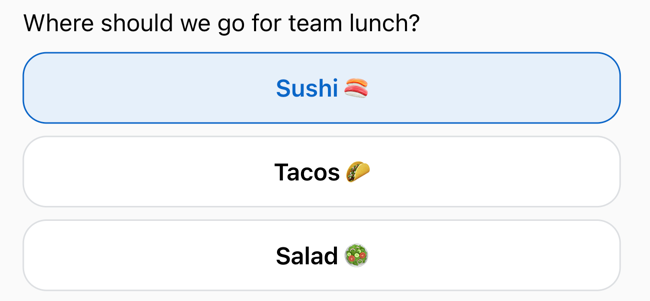
Composite messages are a combination of text and buttons in a single message.
Only Apps can create Composite messages. End clients can receive and display them, but cannot send them.
A WireMessage.Composite object has Base properties and includes a list of Item objects.
Each Item can be one of the following:
WireMessage.Text— A text element. See how to create one.WireMessage.Button— An interactive element that lets users perform an action. Each button includes:text— the label shown on the button.id— a unique identifier for the button, automatically generated unless specified.
Composite message on desktop
- Kotlin
- Java
- Typescript
val compositeMessage = WireMessage.Composite.create(
    conversationId = conversationId,
    text = "What's the best JVM language?",
    buttonList = listOf(
        WireMessage.Button(text = "Java"),
        WireMessage.Button(text = "Kotlin")
    )
)

applicationManager.sendMessageSuspending(compositeMessage)
WireMessage.Composite compositeMessage = WireMessage.Composite.create(
        conversationId,
        "What's the best JVM language?",
        List.of(
                new WireMessage.Button("Java"),
                new WireMessage.Button("Kotlin")
        )
);

applicationManager.sendMessage(compositeMessage);
const compositeMessage = CompositeMessage.create({
  conversationId: conversationId,
  text: 'Composite Title',
  itemList: [
    CompositeButton.create({
      text: 'Button-001'
    }),
    CompositeButton.create({
      text: 'Button-002'
    })
  ]
})

await this.manager.sendMessage(compositeMessage)