Demo for App creation
Walkthrough video for enabling apps
1. Prerequisites
✅ Install Java 17+
Check if Java is installed:
java -version
If not installed:
- macOS:
via terminal
brew install openjdk@17 - Windows: Download from Adoptium Temurin 17.
✅ Install IntelliJ IDEA
Download IntelliJ IDEA Community Edition from: 👉https://www.jetbrains.com/idea/download IntelliJ is used for Kotlin/Gradle development and to run the bot easily. This demo uses this tool. You can use any other equivalent IDE.
✅ Create App
Follow the app creation guide
Now You are 50% Done!
Next Steps - This example is in Kotlin
2. Create a New Kotlin Project
- Open IntelliJ → New Project
- Choose:
- Language: Kotlin
- Build system: Gradle (Kotlin DSL)
- JDK: Temurin 17
- Name your project, e.g. TestApp
3. Configure Gradle Build
Open build.gradle.kts and replace everything with:
plugins {
    kotlin("jvm") version "2.3.10"
}

group = "org.example"
version = "1.0-SNAPSHOT"

repositories {
    mavenCentral()
    maven {
        url = uri("https://maven.wire.com")
    }
}

dependencies {
    implementation("com.wire:wire-apps-jvm-sdk:0.3.0")
}

tasks.test {
    useJUnitPlatform()
}
kotlin {
    jvmToolchain(17)
}
Then click the "Load Gradle Changes" popup
4. Create Your Kotlin File
In IntelliJ:
- Navigate to:
src/main/kotlin - Right click -> New -> Kotlin Class file - Name as Main.kt
Go to Main.kt and the copy the below Kotlin code for the simple echo app
import com.wire.sdk.WireAppSdk
import com.wire.sdk.WireEventsHandlerSuspending
import com.wire.sdk.model.WireMessage

fun main() {
    val wireAppSdk = WireAppSdk(
        apiToken = "YOUR_API_TOKEN",
        apiHost = "YOUR_API_HOST",
        cryptographyStorageKey = "yourGeneratedSecureKeyByteArray!".encodeToByteArray(), // Must be 32 bytes,
        wireEventsHandler = SampleEventsHandler()
    )
    wireAppSdk.startListening()
}
class SampleEventsHandler : WireEventsHandlerSuspending() {
    override suspend fun onMessage(wireMessage: WireMessage.Text) {
        val message = WireMessage.Text.createReply(
            text = "echoing ${wireMessage.text}",
            originalMessage = wireMessage,
            mentions = wireMessage.mentions
        )
        manager.sendMessage(message)
    }
}
Run this to create Main.kt configuration file
5. Run the App
Click the green play ▶️ button beside fun main() in IntelliJ
6. Use the App
- Log in as a different user https://wire-webapp-dev.zinfra.io/
- Create a Group
- Add App into that Group
- Invoke the App
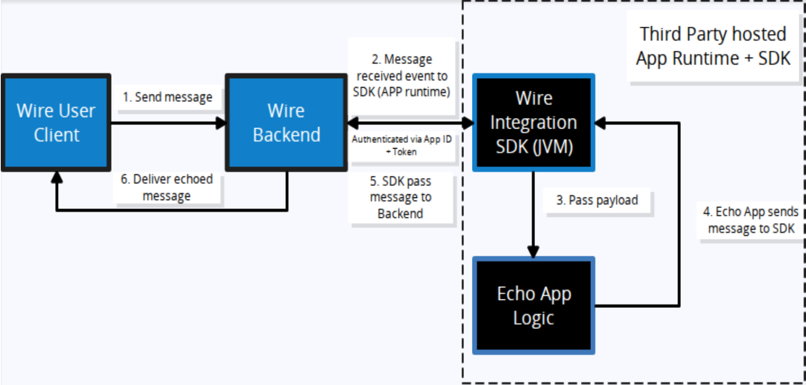
Your First Echo App should Echo the message back!